Website Redesign Without Losing SEO: A Step-by-Step Migration Plan
Redesigns lose rankings for predictable reasons. Here is the inventory, redirect map and launch routine that keep what search engines already understand.

The usual redesign story goes like this. The new site launches on a Friday and everyone is pleased. Three weeks later the enquiry inbox is quiet, and nobody can say why. A website redesign without losing SEO is not a matter of luck or secret tricks. It is a matter of lists: what you have, where each page goes and what you check after launch.
This guide gives you those lists. It follows Google's own guidance on site moves with URL changes, which we re-read on 14 November 2026. It is written for owners and marketing leads who need to brief a developer or an agency.
Key takeaways
- Rankings usually drop after a redesign for one of five avoidable reasons. Each one has a fix below.
- Start with an inventory of every URL and its numbers, before any design work.
- Keep the URLs that work. Redirect the rest one to one with permanent (301) redirects, and never send them all to the home page.
- Change one big thing at a time. Google advises against a new domain, a new CMS and a new layout in a single step.
- Keep the redirects for at least a year, and check Search Console every week for the first month.
Why redesigns lose rankings
Search engines already know your site's addresses, its content and the links that point to it. A redesign can break all three at once.
- Changed URLs without redirects. Old addresses return errors, and the signals they earned are lost.
- Removed or thinner content. A shorter, prettier page may no longer answer the question it used to rank for.
- Broken internal links. Pages that the old menu linked to become hard to find.
- A forgotten noindex tag or robots.txt block. A setting meant for the test site goes live with the new design.
- Slower pages. Large images, video and extra scripts make the new design slower than the old one.
Even a careful move causes some movement. Google's site move guide says so directly:
Expect temporary fluctuation in site ranking during the move.
— Google Search Central, Site moves with URL changes
A good plan keeps that movement small and short.
First, work out what kind of change this is
Not every redesign carries the same risk. Find your row before you plan the work.
| What changes | Risk to rankings | What you need |
|---|---|---|
| A new look, with the same URLs and content | Low | The staging and speed checks in step 4 |
| New URLs or a new CMS on the same domain | Medium | The full plan below, with a URL map and 301 redirects |
| Pages cut, merged or rewritten | Medium to high | The full plan, plus a content check for every page that brings traffic |
| A new domain as well | High | The full plan, plus the Change of Address tool in Search Console |
If you plan several of these, do not do them together. Google's advice is to do them one at a time: move to the new domain first, then change the layout.
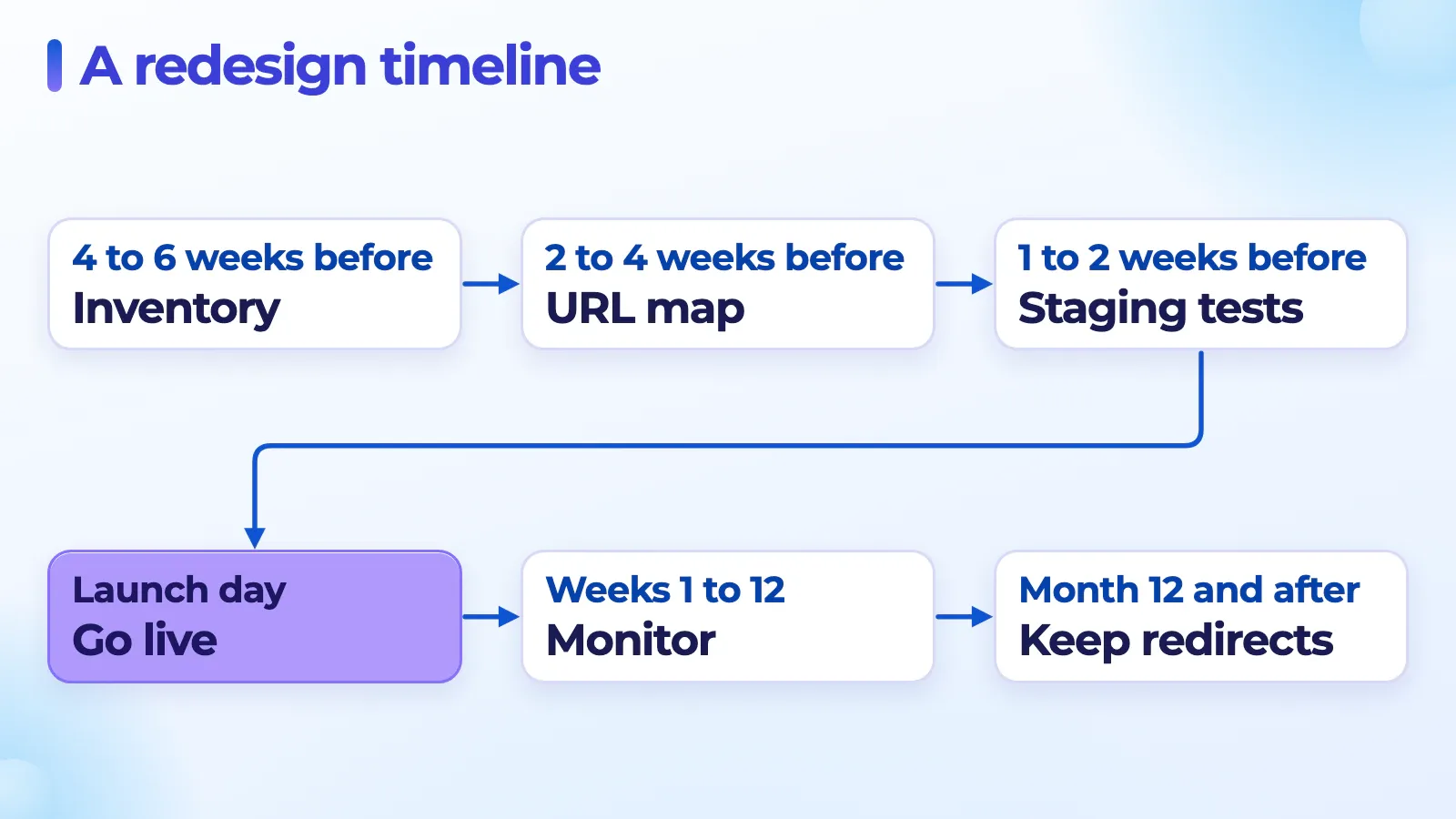
For a site of about 50 pages, start the inventory about six weeks before launch. A larger site or an online shop needs longer.
Step 1: Take an SEO inventory before you design
You cannot protect what you have not listed. Do this before anyone opens a design tool.
- Collect every URL. Use your XML sitemap, your CMS, your analytics and Google Search Console. Each source misses something. Include images and PDFs, because Google says these need to move in the same way as pages.
- Record what each page tells search engines. Note the page title, meta description, main heading, structured data and the internal links that point to it.
- Save your baseline. Export clicks, impressions and average position per page from the Search Console Performance report. Export enquiries per landing page from analytics. Without these numbers you cannot judge the launch.
- Mark the pages that matter most. Sort by clicks and by enquiries. These pages should move with little or no cutting.
A spreadsheet is enough for most business sites. Your export will usually show a handful of pages bringing most of the search traffic. That is where the care goes.
Step 2: Build the URL map
The URL map is a table with every old URL in one column and its new home in the next. It is the core of the whole plan, and it doubles as the test list for launch day.
Keep, redirect, merge or retire
Every old URL gets one of four decisions.
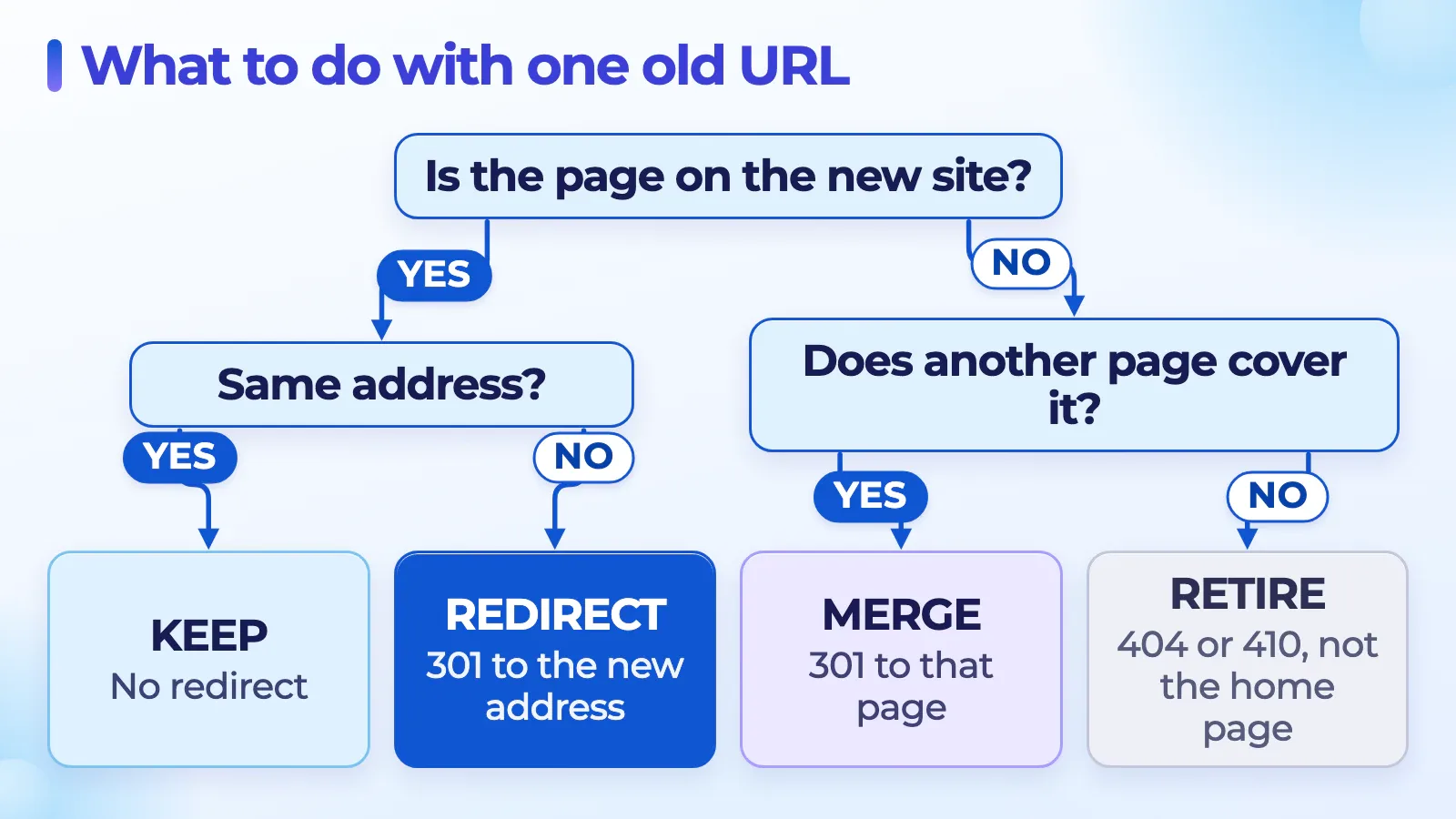
- Keep. The safest redirect is the one you never need. If an old URL is short and clear, keep it.
- Redirect. When a URL must change, send it to the closest matching page with a permanent redirect (301 or 308). Google shows the new address for a permanent redirect and keeps the old one for a temporary redirect (302 or 307), so the type matters.
- Merge. Several old pages can redirect to one new page, as long as that page really covers what they covered.
- Retire. If a page has no real match, let it return a 404 or 410 status.
A worked example
Here is part of a map for a fictional company site that is moving from old PHP addresses to clean ones.
| Old URL | Clicks in 12 months | New URL | Action |
|---|---|---|---|
| /layanan.php?id=3 | 2,140 | /layanan/pembuatan-website | 301 redirect |
| /about-us | 310 | /about-us | Keep |
| /promo-2023 and /promo-2024 | 95 | /promo | Merge, 301 both |
| /karir/admin-2021 | 0 | None | Retire, returns 410 |
Add two columns when you build yours, "Redirect tested" and "Notes", and the template is complete.
Three rules for redirects
- Set them up on the server. Google's page on redirects and Google Search calls a permanent server-side redirect the best way to send both people and Google to the right page. JavaScript redirects are a last resort.
- Point each one straight at the final page. Chains add delay for visitors, and Google advises redirecting to the final destination directly.
- Do not send many old pages to the home page. Google says this confuses visitors and may be treated as a soft 404 error.
Step 3: Carry over what search engines already understand
A redesign often rewrites copy, menus and templates at the same time. Check that these survive:
- Titles, descriptions and headings. Improve them if you like, but keep the topic and main phrase of every page that ranks.
- Body content. If a top page shrinks from 800 words to a slogan and three icons, expect it to rank for less.
- Internal links. Update menus, footers and in-text links to point at the new URLs directly, not through redirects.
- Canonical tags. Each page should name its own new URL. Google's guide to consolidating duplicate URLs calls redirects and canonical tags strong signals and a sitemap a weak one, so make all three agree.
- Image alt text and structured data. Both are easy to lose when templates change.
- Language versions. Many Indonesian business sites run in Bahasa Indonesia and English. If yours uses hreflang tags, Google's guide to localised versions requires each version to list itself and every other version. Tags that do not point both ways are ignored, so update both sides.
Step 4: Test on staging before launch
Keep staging out of search the right way
A robots.txt block alone is not enough. Google's robots.txt introduction states that the file is not a mechanism for keeping a page out of Google, and a blocked page can still be indexed if other sites link to it. A password is the cleanest option for a test site. A noindex tag also works, but only if robots.txt does not block the page. Otherwise the crawler never sees the tag.
Write down every block you add. Each one must come off on launch day.
Run these checks
- Crawl the staging site for broken links, missing titles and stray noindex tags.
- Test every line of the URL map. Each old URL should reach its new page in one step.
- Check key pages on a real phone, including forms and WhatsApp click-to-chat buttons.
- Confirm analytics and conversion tracking fire on the new templates.
- Compare speed with the old site against Google's Core Web Vitals. A new design should never be slower than the one it replaces. If it is, our short overview of website performance techniques lists the usual places to start.
Step 5: Launch day
Pick a quiet period, and not a Friday afternoon, when nobody will be around to watch the result. Google suggests timing a move for a regular dip in traffic, so fewer people meet any problem. If your busy season is Ramadan or the year-end sales, do not launch in the middle of it. For a small or medium site, Google recommends moving all URLs at once and not section by section.
- Deploy the redirects at the same moment as the new site.
- Remove the passwords, noindex tags and robots.txt rules that only belonged to staging.
- Test the redirects again on the live site, starting with your top pages.
- Submit the new XML sitemap in Search Console. Google says you can remove the old sitemap at this point.
- Use the URL Inspection tool on a handful of key pages.
- Update the links you control: Google Business Profile, social profiles, e-mail signatures and adverts.
- Use the Change of Address tool only if you moved to a new domain or subdomain. Google's help page for the tool says not to use it for path changes on the same site or for a move from HTTP to HTTPS.
Step 6: Watch the first 90 days
For a medium-sized site, Google says it can take a few weeks or more before new URLs replace the old ones in results. Use that time to catch problems while they are still small.
| When | What to check | Act if |
|---|---|---|
| Day 1 | Top 20 old URLs redirect, forms send, tracking works | Any of them fails |
| Weeks 1 to 4, weekly | The Page indexing report in Search Console | "Not found (404)", "Soft 404" or "URL marked 'noindex'" grows |
| Weeks 2 to 12 | Clicks and enquiries against your baseline | A top page falls and does not recover |
| Month 12 | Redirects are still in place | Someone plans to tidy them away |
"Page with redirect" will rise for your old URLs. That is expected: Google's help page describes it as a URL that redirects to another page, so the old address itself is not indexed. Unexpected 404s need a line added to the URL map. A page marked noindex needs the tag removed.
Keep your redirects for as long as you can. Google recommends at least one year, and suggests keeping them indefinitely for the sake of visitors.
Who does what
The plan needs named owners. It fails when everyone assumes someone else has the list.
| Task | Owner | Effort on a site of about 50 pages |
|---|---|---|
| Inventory and baseline export | Marketing lead | About a day |
| URL map and page decisions | Marketing lead with the developer | One to two days |
| Redirects, canonical tags, sitemap | Developer or agency | About a day, plus testing |
| Content check for top pages | Marketing lead or copywriter | A few hours per page |
| Launch checks and weekly monitoring | One named person | About an hour a week |
These efforts are a rough guide, not a quote. Larger sites and online shops need more. If you are hiring help, ask who builds the redirect map before you sign.
Common mistakes
- Starting the SEO work after the design is approved, when the page structure is already fixed.
- Trusting the sitemap as the full list of URLs. Old campaign pages and PDFs are rarely in it.
- Using temporary (302) redirects for a permanent move.
- Launching without a baseline, then arguing about whether traffic fell.
- Leaving the staging noindex in place. One line of code can hide a whole site.
- Removing redirects after a few months to tidy up the server.
- Changing domain, CMS and design in the same week.
FAQ
Can I do a website redesign without losing SEO?
Yes, for most sites. Keep the URLs that work, redirect the rest one to one, keep the content that ranks and test before launch. Some movement in the first weeks is still normal.
How long does it take for rankings to settle?
Google's general rule for a medium-sized site is a few weeks or more, and longer for large sites. Judge the result against your baseline after about three months, not after three days.
How long should I keep 301 redirects after a redesign?
Google advises at least one year. Keeping them longer helps people who still use old links and bookmarks.
Should I redirect deleted pages to my home page?
No. Redirect each page to its closest match. If nothing matches, let the old URL return a "not found" status.
Will a better design improve my rankings on its own?
Not on its own. A faster, clearer site can help visitors and conversions. Rankings still depend on the content and links you carry over. If the new design also needs to convert better, review the key journeys on the staging site before launch.
Planning a redesign? Work with GOTEN
If a new site is on your roadmap, our web and app development service can help you plan a website redesign without losing SEO. The inventory, the URL map, the redirects and the launch checks in this guide are a good place to start the conversation.
You can browse some of our projects, such as Portavera and Hart, in our work section. When you are ready, plan your redesign with us.